
SMS Consent & Opt-In
SMS Consent & Opt-In — Xzyon EMS Crew Alerts
Last updated: October 13, 2026
This page documents how people opt in to Xzyon EMS Crew Alerts, the text-message (SMS) program operated by Eastside Emergency Medical Services LLC, doing business as Xzyon EMS. The opt-in control is inside the Xzyon EMS Crew mobile application, which requires a crew member’s sign-in, so it cannot be opened from a public web address. The screens below show the implemented opt-in experience, and the exact consent language, for review.
| Brand / sender | Eastside Emergency Medical Services LLC, doing business as Xzyon EMS |
|---|---|
| Program name | Xzyon EMS Crew Alerts |
| Who can opt in | Xzyon EMS crew members only, using their own account in the Xzyon EMS Crew application. Not offered to the general public. |
| Messages | Operational notifications about dispatch assignments, reassignments, and cancellations, stating the call priority (RED, YELLOW, GREEN, or BLUE) and the unit name. No marketing or promotional messages. No patient information. |
| Opt-in method | Voluntary, explicit checkbox in the Xzyon EMS Crew app, not selected by default. Not required to use the app and not a condition of employment. |
| Policies | Privacy Policy — SMS/Text Message Privacy · Terms & Conditions — SMS Terms |
Exact consent language
This is the complete text displayed next to the SMS consent checkbox in the Xzyon EMS Crew app:
I agree to receive operational text messages from Xzyon EMS Crew Alerts, a program of Eastside Emergency Medical Services LLC (Xzyon EMS), about dispatch assignments, reassignments, and cancellations. Message frequency varies. Message and data rates may apply. Reply STOP to opt out, START to opt back in, or HELP for help.
The same screen also states: “Consent is voluntary. It is not required to use the Xzyon Crew app and is not a condition of employment.” and “Messages do not include patient information. Open Xzyon Crew for trip details.” It includes working links to this site’s Privacy Policy and Terms & Conditions. Message frequency (“varies”), the “message and data rates may apply” notice, and the STOP, START and HELP instructions are all part of the consent text above.
The opt-in screens
A crew member opens SMS alerts from the top of the Xzyon Crew app. It is available as soon as they sign in — before they start a shift — and again on the main screen during a shift. Saving a phone number does not enroll anyone; enrollment happens only when the crew member selects the consent checkbox and saves their preference.
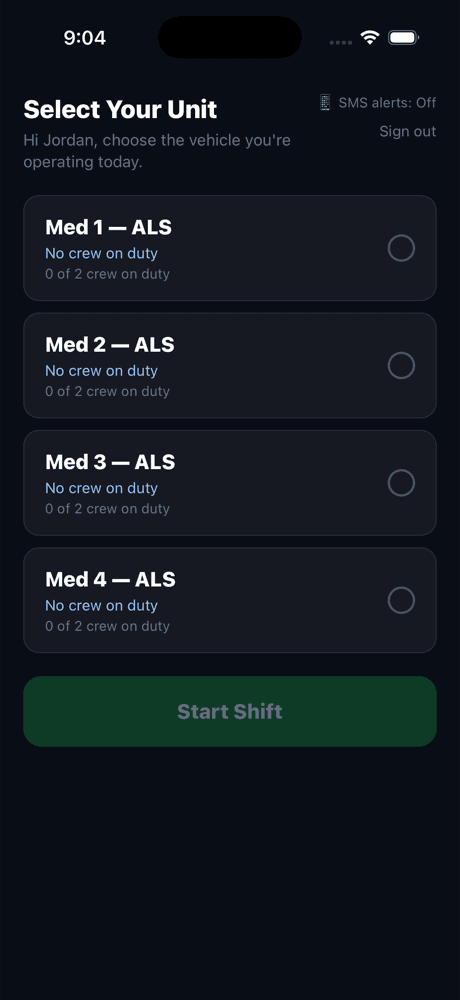
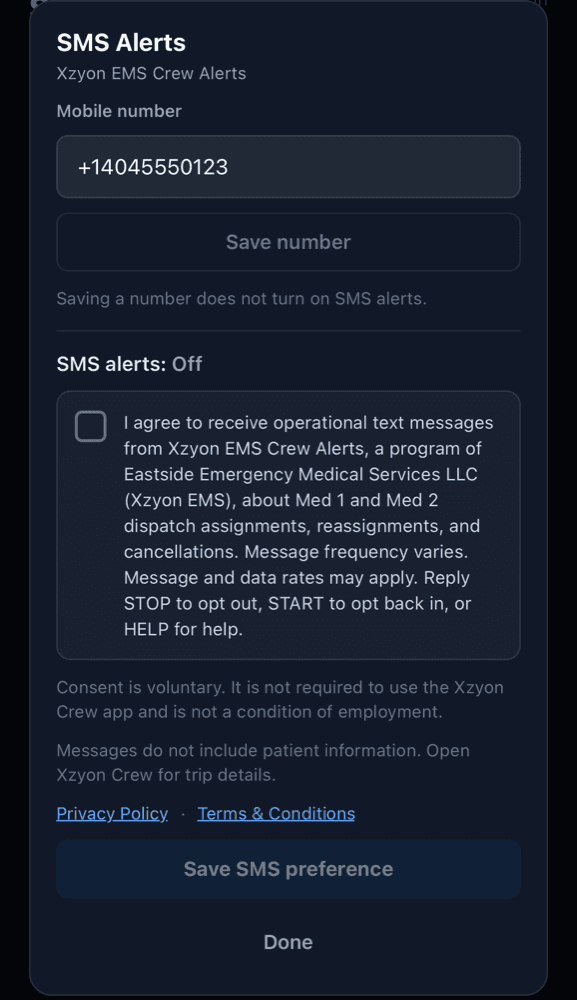
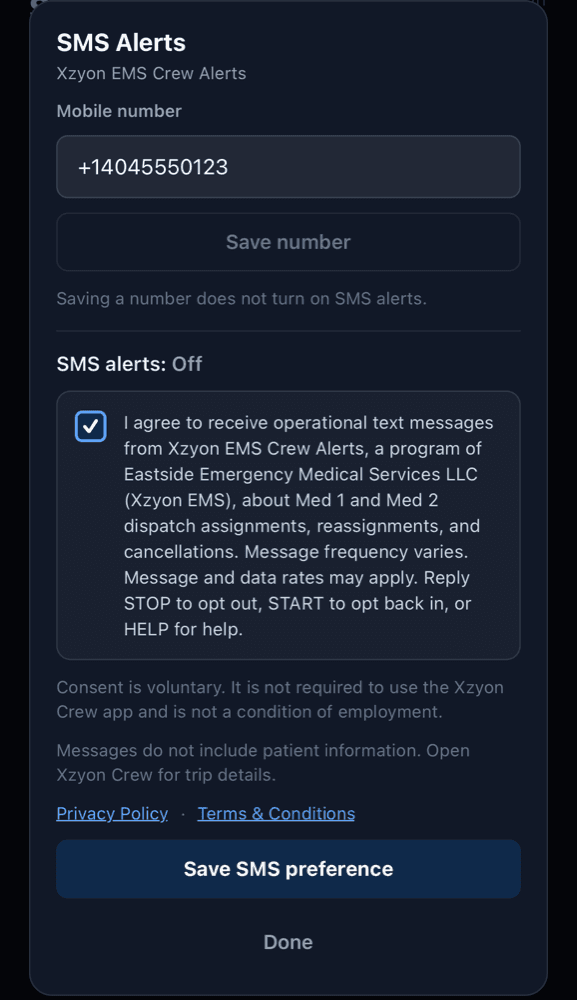
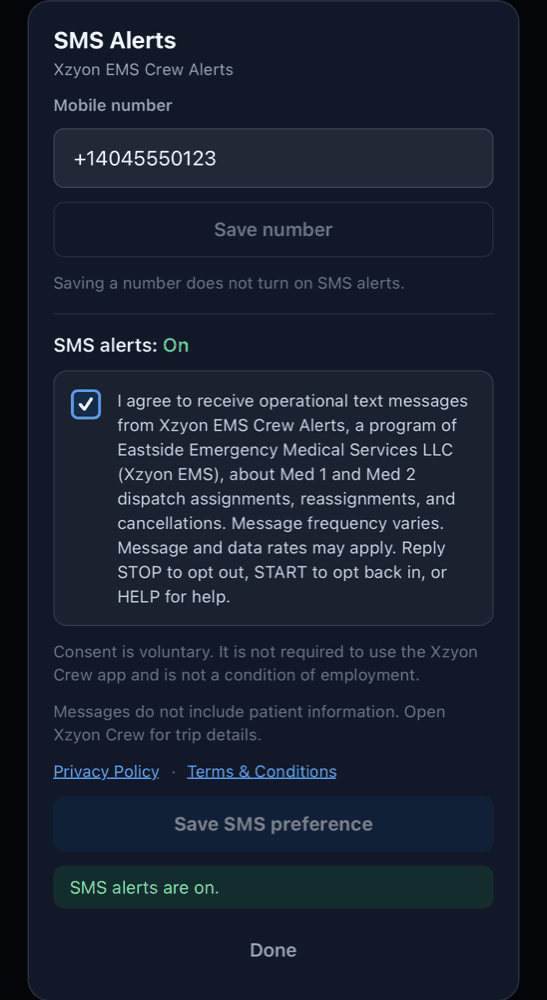
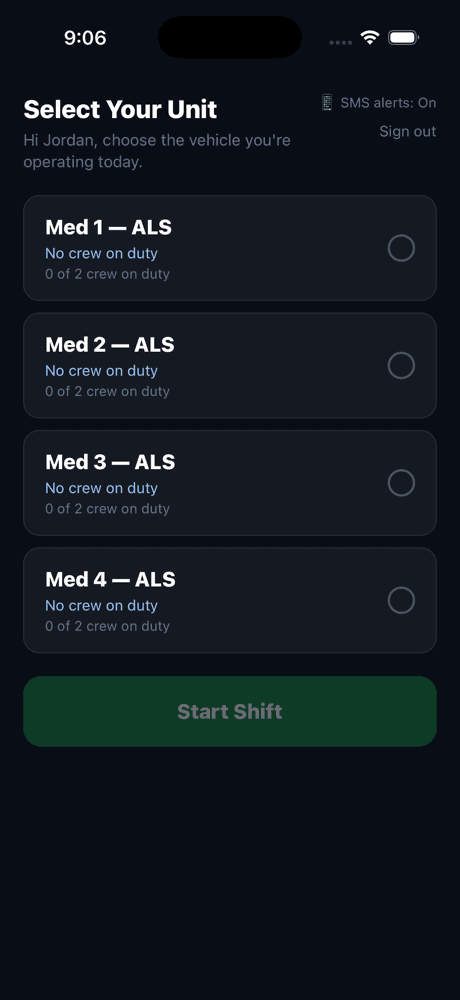
The screenshots were captured from the Xzyon EMS Crew application in an iOS Simulator using a test account and a fictitious phone number; the layout and wording are those of the application itself. When a crew member consents, Xzyon EMS records the date and time, the phone number, the version of the consent language shown, and that it was given through the Crew app. A later STOP reply, or turning alerts off in the app, is recorded the same way, and changing the phone number ends consent for the old number.
Message content
Messages are short and contain no patient information, facility names, addresses, or trip details. Examples of the three message types:
Xzyon EMS Crew Alerts: New RED priority assignment for Med 1. Open Xzyon Crew for details. Reply STOP to opt out, HELP for help.
Xzyon EMS Crew Alerts: YELLOW priority call reassigned to Med 2. Open Xzyon Crew for details. Reply STOP to opt out, HELP for help.
Xzyon EMS Crew Alerts: GREEN priority call for Med 3 was cancelled. Open Xzyon Crew for details. Reply STOP to opt out, HELP for help.
Opting out, opting back in, and help
- Reply STOP to any Xzyon EMS Crew Alerts message to opt out.
- Reply START to opt back in after opting out.
- Reply HELP for assistance.
- Or change the SMS preference in the Xzyon EMS Crew app at any time.
Message frequency varies. Message and data rates may apply. For general questions, contact admin@xzyonems.com. A phone number given through this website’s Contact form or Careers application does not enroll anyone in Xzyon EMS Crew Alerts. Mobile numbers and SMS opt-in data are not sold or shared with third parties or affiliates for marketing or promotional purposes; see the Privacy Policy and SMS Terms.